Guest Post Marketplace Safety: How to Spot Fake Sites, PBNs, and Scams Before You Pay

Guest post marketplaces are safe when you vet each site yourself before paying. A platform rating confirms delivery — it says nothing about whether the link will help you rank, stay live, or come from a real editorial site. Your pre-purchase checklist is the only thing that decides safety.
The three most costly mistakes buyers make: paying for a placement on a private blog network (PBN) or link farm disguised as a real blog; having a post deleted days later because the seller never actually controlled the site; and sending payment off-platform with no way to dispute. This guide covers all three — with a 10-minute vetting routine, a pass/fail scorecard, and what to do after you’ve already bought bad links.
What “Guest Post Marketplace Safety” Means — and What It Doesn’t
A marketplace handles payment protection. It does not audit every site in its catalog. That gap is what scammers exploit, and why buyer-side vetting is non-negotiable regardless of the platform you use.
A safe guest post has five verifiable properties: it lives on a site with real, organic traffic from a relevant audience; contains a live, in-body, followed link pointing to an indexable page; was placed by a seller who demonstrably controls the domain; was paid through an escrow channel with a documented dispute path; and comes with a written guarantee window and a replacement or refund process.
A delivery confirmation is the floor. Your own checks — run before you pay — are what sit above it.
How to Spot Fake Guest Post Sites, PBNs, and Link Farms
A PBN (private blog network) is a cluster of sites built solely to manufacture backlinks, typically on expired domains carrying residual authority from their previous owners. A link farm is a similar network of sites linking mainly to each other. Both are listed in guest post marketplaces as genuine placements, sometimes with inflated DR or DA figures attached.
The outbound link audit: fastest PBN signal
Open five recent articles on the site and list every commercial outbound link. A real technology blog links to tools, research, and other tech content. A PBN in disguise links to payday loans, online casinos, CBD products, and cryptocurrency wallets — mixed into the niche you’re purchasing. That cross-niche commercial footprint is visible in free tools and takes under three minutes to identify. Verified community discussions in SEO forums confirm this pattern has persisted for years; it is a durable fraud, not a new one.
The Wayback Machine check
Check the domain at three and five years ago on web.archive.org. If it was a parked domain, an unrelated local business, or a different niche entirely — and is now a slick “general lifestyle blog” accepting posts on any topic — the domain was purchased for its residual authority. Walk away.
How to Check DA, DR, and Traffic Without Being Fooled
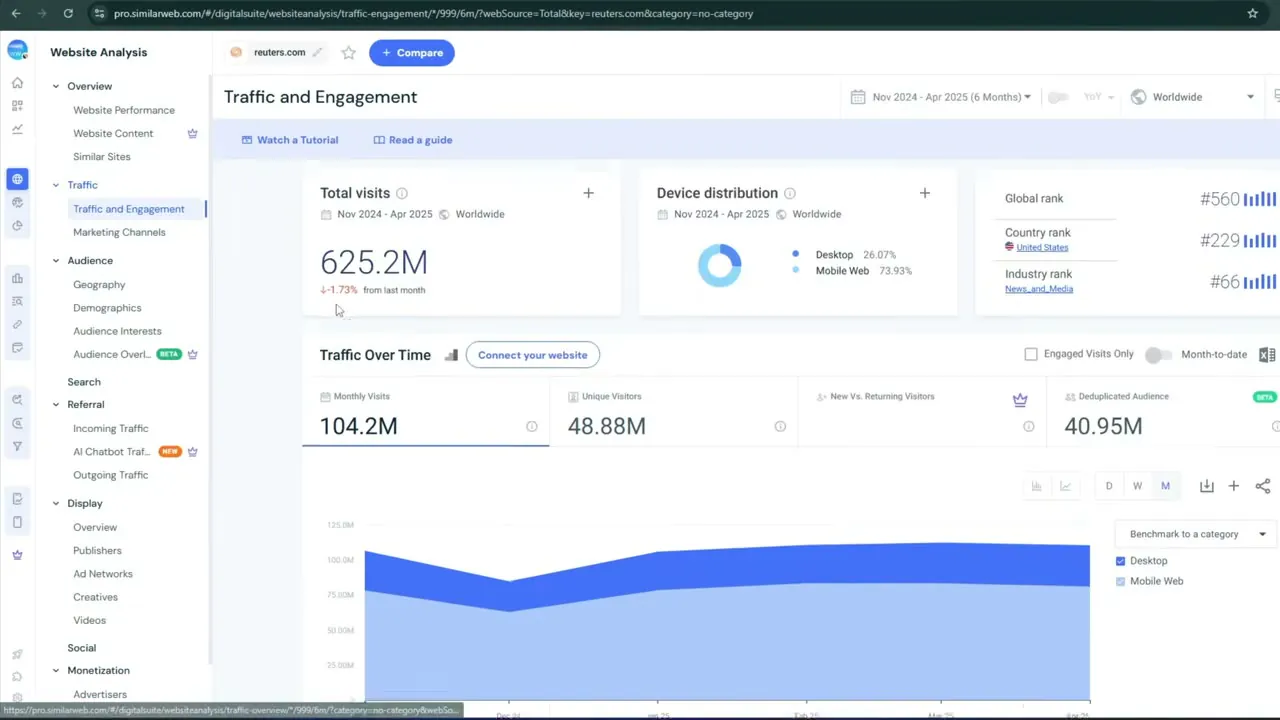
Do not trust a single metric. DR and DA are inflatable through link-exchange networks, expired-domain redirects, and layered spam. A DR 55 site can have zero organic keyword rankings and no real readership.
Run a bundle check, not a number check:
- Cross-check DR against organic keyword count in the same tool. High DR with near-zero organics = stop.
- Check traffic by channel, not total. Real sites grow through organic search. Traffic that is 90%+ referral, email, or direct — with no organic component — indicates manipulation.
- Check the traffic trend over 12 months. One spike followed by a flatline is not an active editorial site.
- Run a spam score check. SEO vetting guides reviewed for this article consistently flag 30% or above as a hard stop — treat any score in that range as a reason to decline.
Seller screenshots are not evidence. Ask for a full, uncropped, dated Ahrefs or Semrush report — or pull it yourself.
The 10-Minute No-Paid-Tool Guest Post Safety Routine
This routine costs nothing and takes 10 minutes. It requires only Google and the Wayback Machine — free tiers of Ahrefs or Moz are optional.
Domain history (2 min)
web.archive.org → check 3 years ago, then 5. Sudden niche pivot = stop.
Site: search (1 min)
site:domain.com in Google. Compare indexed count to seller’s claim. Large gap = non-indexed or blocked content. After delivery: also run site:domain.com/your-post-url to verify your post is indexed.
Last 30 titles (2 min)
Scroll the blog. Genuine niche sites are topically consistent. A link factory publishes anything from anyone for a fee.
5-article outbound audit (3 min)
Open five recent posts. List every commercial link and the niche it serves. One casino link on a tech blog is suspicious. Several, across articles, pointing to casino/payday/crypto = walk away.
Author check (2 min)
Click two or three bylines. Real editors have LinkedIn profiles, traceable job histories, or bylines across related publications. “Admin,” “Team,” or a reverse-image-search hit on a stock library = red flag.
Pass/Fail Scorecard: Rate Any Site Before You Pay
Use this table before ordering. Two or more fails on the ✱ critical checks — or five or more total fails — means walk away.
| Check | Pass | Fail — Stop |
|---|---|---|
| ✱ DR/DA vs organic keywords | Both present and consistent | DR high, near-zero organics |
| ✱ Traffic by channel | Organic is the majority source | 90%+ referral / direct / email |
| ✱ Domain history | Consistent niche 3+ years | Pivot from unrelated content |
| ✱ 5-article outbound links | Relevant, varied sources | Casino / payday / CBD / crypto mix |
| Spam score | Below 30% | 30% or above |
| site: vs claimed count | Within 20% | Large gap or non-indexed |
| Last 30 titles | Consistent niche | Any topic, any niche |
| Author transparency | Real name, LinkedIn, bylines | “Admin” / stock photo |
| Seller history | 20+ completed orders, reviews | Zero orders, no track record |
| Ownership verifiable | Platform badge or domain-email proof | Cannot verify / reseller signals |
How to Avoid Guest Posting Scams: Pre-Payment Red Flags
Walk away immediately if any of the following are present:
Domain withheld before payment
Legitimate sellers name the site upfront. “I’ll share after you pay” means a site you would never have accepted.
24-hour turnaround
Real editorial review takes days to weeks. Overnight delivery means no review happened.
Flat rate for every niche
Plus add-on fees for casino/crypto/CBD only. A rate card that ignores traffic and topical relevance is a factory model.
Guaranteed rankings
No seller controls Google. This is a sales line.
Seller cannot answer editorial questions
Unable to name the editor, describe the posting schedule, or explain the link placement policy? They do not control the site.
Urgency or pressure
“Slot closes today.” Real placements do not expire in hours.
Off-platform communication
Any request to move to WhatsApp, Telegram, or email before payment voids your dispute protection. Every message belongs inside the platform.
Safe Payment and What Must Be in Writing Before You Pay
Use platform escrow only — never pay through a link the seller sends you.
The fake-escrow fraud appears in verified forum research: a link to a near-identical escrow site on a different domain, with a “confirm receipt” button that asks to connect a crypto wallet. The platform’s own escrow operates on the marketplace’s domain. Any escrow link from the counterparty is a red flag; refuse it.
Never pay via: crypto upfront, PayPal Friends & Family, bank wire, or any off-platform transfer.
What must be confirmed in the platform chat before money moves
- Exact domain name of the placement site
- Section of the site — main editorial feed, not a “partner,” “sponsored,” or “resources” subfolder
- Link attribute: dofollow, nofollow, or rel=“sponsored” — confirmed in writing
- Anchor text: branded or natural, not exact-match commercial keyword
- Guarantee window: minimum 6–12 months with replacement or refund if the link is removed
- Delivery reporting: live URL, anchor text, target page, publication date, and metrics
- Refund or replacement terms if the post is deleted or moved
On paid-link disclosure: Google’s link spam policy treats payment for ranking-passing links as a paid link, which should carry rel=“sponsored” or rel=“nofollow”. Sellers who say “Google can’t tell” are not offering compliance advice. Get the attribute in writing and factor the disclosure requirement into your decision. See our pricing guide.
Seller Ownership Verification and Reseller Detection
Ask for proof of domain control before any money moves. A legitimate seller can verify via a platform ownership badge, an email from the domain’s own address, or a DNS/HTML verification the marketplace runs. A reseller listing a site they do not own cannot complete any of these.
Reseller signals: the same site appears on multiple seller profiles at different prices; the seller cannot name the editor or describe the site’s editorial guidelines; unexplained delays follow payment; delivery requires “a third party to confirm.”
A case documented in a verified BlackHatWorld dispute thread shows the exact failure: the seller had not paid the site owner, who removed all posts shortly after publication. The buyer lost the link, the post, and the money — with no recourse because the seller was banned after the fact. The lesson: proof of ownership is not optional, and the platform chat log is your only dispute evidence. Keep every message there.
Detecting Fake Traffic, Fake Reviews, and Fake Screenshots
Fake traffic
Near-zero organic channel; 100% from one unrelated country; a single spike then flatline. Always check by channel and geography — not from a screenshot.
Fake reviews
All-positive ratings with repeated phrasing, reviewers with no visible order history, or a cluster of reviews posted in a single short window. Where platforms display order counts, compare review volume to completed orders — they should scale together.
Fake screenshots
Cropped to hide the domain or date; “organic traffic” shown as a single total with no channel breakdown; old reports presented as current. Request a live, full-screen, dated export — or run the check yourself before ordering.
Buyer, Seller, and Publisher Safety
For buyers
The primary risks are PBNs, vanishing links, and payment fraud — all covered above.
For sellers
The main exposure is a buyer who accepts delivery, benefits from the link, then disputes the order. Mitigation: screenshot every live post at the moment of delivery, keep escrow active until the buyer explicitly approves, and never accept off-platform payment.
For publishers (site owners accepting paid posts)
Publishers are the target of a distinct and documented fraud: an “agency” contacts the site owner, promises payment per published post, insists the content go live first, then never pays. Open-source research describes this pattern explicitly — it is widespread and specifically targets smaller blogs. The rule for any publisher: no upfront payment confirmed through platform escrow = no post. Verify the buyer’s identity, review their site, and publish only after payment is secured. Want to list with protected payment terms? See our publisher packages.
What to Do After Buying a Bad Guest Post Link
Do not disavow immediately. SEO guidance consistently notes that genuinely low-quality links are often already ignored algorithmically, and a hasty disavow file can remove links that pass no harm — or cause collateral damage to neutral ones.
The right sequence:
- Stop. No more orders from that seller or platform.
- Document. Screenshot the live link, save all chat logs, save the delivery confirmation.
- Request removal or replacement through the platform chat.
- Escalate to a platform dispute if the seller is unresponsive.
- Disavow only after a confirmed manual action, or when a site audit reveals a clear paid-link pattern you cannot remove through outreach.
Links on non-indexed or low-traffic pages typically pass no signal. A manual action — not a weak link — is the risk that requires urgent response.
Guest Post Marketplace vs Direct Outreach
Use a marketplace for speed and budget-controlled scale. Use direct outreach for top-tier publications and brand authority.
| Factor | Marketplace | Direct Outreach |
|---|---|---|
| Speed | Days | Weeks to months |
| Budget | Accessible at smaller scale | Higher cost per placement |
| Scam risk | Lower — platform escrow | Higher — unknown contacts, no escrow |
| Site quality ceiling | Variable; your checks decide | Higher, but harder to reach |
| Scalability | Easy | Difficult |
| Relationship building | Minimal | Long-term, high-value |
TheGuestPoster offers both: a DIY publisher marketplace and a managed outreach service. For deeper tactics, see our guides on outreach, outreach email templates, how to find guest posting opportunities, how guest post marketplaces work, how to submit a guest post, and guest post costs and pricing.
7 Frequently Asked Questions About Guest Post Marketplace Safety
Are guest post marketplaces safe for SEO?
Yes — when you vet each site before paying. Platform safety (payment protection) and site quality (actual SEO value) are separate things. Your vetting checklist connects them.
How do I know if a site is a PBN or link farm?
Run the 5-article outbound audit and check the domain’s Wayback Machine history. PBNs link to unrelated commercial niches (casino, payday, crypto) from within editorial content and have little to no organic search traffic. One cross-niche commercial link is suspicious; a consistent pattern across multiple articles is definitive.
What if my post or link disappears after I pay?
Screenshot the live link on delivery day — that screenshot, combined with your platform chat log, is your dispute evidence. Open a dispute through the platform immediately. Off-platform messages cannot typically be submitted as evidence.
Should the link be dofollow, nofollow, or rel=“sponsored”?
Confirm the attribute in writing before paying. Dofollow passes ranking value; paid links that pass ranking value should carry rel=“sponsored” per Google’s policy. Get this confirmed in the platform chat — not in a verbal assurance.
Can buying guest posts result in a Google penalty?
The risk depends on execution. Real editorial content on relevant, organic-traffic sites carries low risk. Paid links on PBNs and link farms — especially at scale or in an unnatural anchor-text pattern — carry manual-action risk. Relevance, quality, and a natural link profile are the mitigating factors.
What is the safest payment method for guest posts?
Platform escrow, funded by credit card or debit card with dispute rights, held until you approve delivery. Never: crypto upfront, PayPal Friends & Family, bank wire, or any escrow link the seller sends you directly.
Is direct outreach safer than buying from a marketplace?
Direct outreach has a higher quality ceiling but higher individual fraud risk — no escrow, no dispute system, no seller history to check. A reputable marketplace with your own vetting applied is safer than an unprotected off-platform deal. See our outreach guide for how to combine both.
Ready to Buy Guest Posts Safely?
Put the checklist to work on vetted publishers — or let our team handle the vetting for you.
Similar Posts

Guest Post Marketplace: How It Works, Pricing & Safety Guide
How guest post marketplaces work, what they cost, and how to buy placements safely.
Read more →
How Much Does a Guest Post Cost? A Practical Pricing Guide for 2026
Realistic guest post pricing ranges and what drives the cost of a placement.
Read more →
Guest Post Outreach: How to Find Sites, Pitch Editors, and Earn Placements
Find real sites, pitch editors, and earn placements with a repeatable outreach process.
Read more →